
How I designed APIs for Web3 — the ownership model
Why the frontend can't call IPFS directly, how an Express proxy becomes a secure access layer, and the three-tier ownership model: Blockchain → IPFS → Backend → Frontend.
I got a DM at 11pm.
"Hey, nice project. Also... is this your Pinata API key? I found it in your JS bundle. pk_...5f8a. Might want to rotate that."
I opened Chrome DevTools. Sources tab. Searched "pinata".
There it was. Baked directly into the compiled JavaScript. My production Pinata API key. Readable by any visitor. No hacking required. Just Ctrl+F.
Within 20 minutes I had rotated the key, revoked the old one, and started thinking about why this happened — and how to fix it permanently.
1. The Story: The DM That Changed My Architecture
I had built ChainElect's voter registration to upload profile images directly to Pinata from the React frontend:
The REACT_APP_ prefix is a Vite/CRA convention that bakes the value into the compiled JavaScript bundle. It is not secret. It is not hidden. It is sent to every browser that loads your site. Anyone who opens DevTools → Network → copies the Authorization header has your API key.
In my case, the damage was minor: someone used my key to upload a few hundred megabytes of junk files, burning through my Pinata storage quota overnight. It could have been much worse.
2. The Metaphor: The Nightclub Wristband
A nightclub has a VIP room. The way IN to the VIP room is a wristband check at a bouncer's door.
If you give every guest the bouncer's master override keycard when they walk in the front door, the VIP room is not protected. Anyone can walk in and help themselves to the private bar.
The frontend is the public lobby. Your API keys are the master keycard. You never give master keycards to guests in the public lobby.
Instead, a proper system works like this:
- A guest (frontend) requests access to the VIP room (IPFS upload).
- They show their ticket (authenticated session) to a staff member at the desk (the backend).
- The staff member verifies the ticket and then uses their master keycard to grant access.
- The guest never touches the keycard.
The backend is your staff member. The frontend is the public lobby. They are not the same thing.
3. The Visual Ownership Model
[!TIP] VISUAL TRIGGER FOR FRONTEND: Animate this as two data flow diagrams side by side. In the broken architecture, highlight the API key leaking into the public browser box in red. In the secure architecture, the API key never leaves the server box — animate it as a locked vault that only the backend can open.
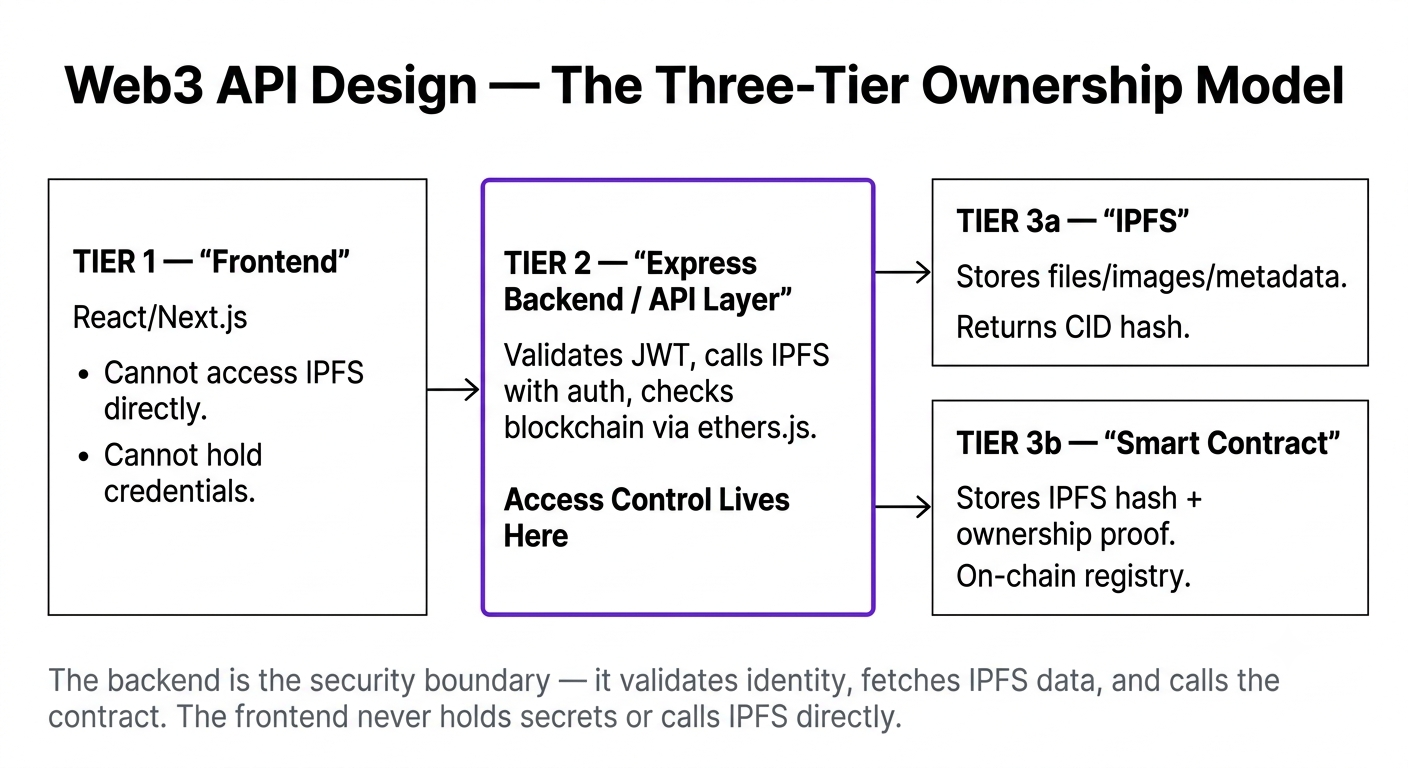
4. Technical Explanation: The Three-Layer Ownership Model
Once I refactored ChainElect to use a proper backend proxy, I discovered the natural architecture that emerges in every serious Web3 dApp:
Each layer has one job. Each layer trusts only the layers it directly communicates with.
5. The ChainElect Backend in Practice
Here is the actual Express proxy pattern from ChainElect's backend (server.js):
The frontend calls POST /api/upload-image with the file. It gets back a CID. It never knows the Pinata API key exists.
The backend in a Web3 dApp is NOT the trust layer. The blockchain is the trust layer. The backend is the access control layer — it manages authentication, rate limits, API secrets, and caching. If your backend goes down, users lose access to the UI, but the on-chain data (votes, ownership records, proofs) remains perfectly intact and verifiable by anyone with an RPC node.
The .env False Security Trap:
Many developers think that putting API keys in .env files makes them secret in frontend projects. It does not. Vite and Create React App both bundle any variable prefixed with VITE_ or REACT_APP_ directly into the compiled JavaScript output. These values are fully visible in production bundles. Only variables used by a server-side process (Node.js, Next.js API routes, Express) are truly private.
Open any production dApp that uses IPFS uploads (like a minting site). Open DevTools → Network → filter by XHR. Find an upload request. Check the Authorization headers. Is the API key visible? If so, you've found a real security vulnerability — this is a common mistake in early Web3 projects.
Was this lesson helpful?
Let us know what you think of this specification. (submitting anonymously)