T2/M2.3/Building the Express proxy layer for IPFS uploads
beginner 15m read
Building the Express proxy layer for IPFS uploads
The complete Node.js/Express backend that proxies IPFS uploads, validates sessions, and keeps API keys server-side only.
#express #node #ipfs #proxy #backend
Once I knew that API keys couldn't live in the frontend, I needed to build the backend fast.
The design goal was simple: the frontend should be able to upload files to IPFS without ever knowing the Pinata API key exists.
Here is exactly how I built it in ChainElect.
1. The Architecture Before and After
Before (broken):
SmartAccount.sol
React ──── Pinata API key in JS bundle ────► Pinata
                                              IPFS pin created
After (secure):
SmartAccount.sol
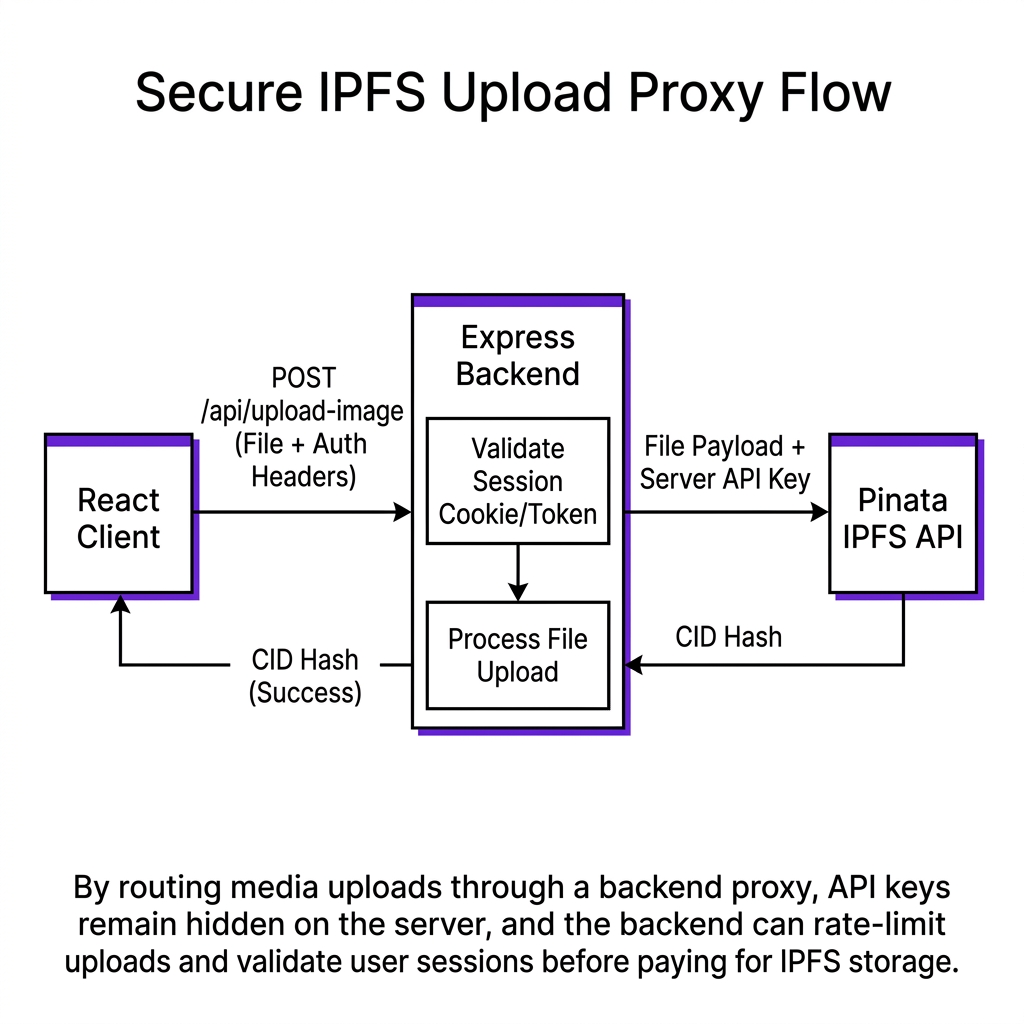
React ──── POST /api/upload (with session cookie) ────► Express Server
                                                              │
                                                    Validate session
                                                    (isAuthenticated middleware)
                                                              │
                                                    Read PINATA_KEY from .env
                                                    (server process only)
                                                              │
                                                    Forward to Pinata API
                                                              │
                                                    Return CID to React
                                                              │
React ◄──────────────────────────── { cid: "QmXyZ..." }
By routing media uploads through a backend proxy, API keys remain hidden on the server, and the backend can rate-limit uploads and validate user sessions before paying for IPFS storage.
2. The Backend Setup: Express + Multer + Supabase
ChainElect's backend is a standard Express server with three key dependencies:
package.json
json
// context/ChainElectBackend/package.json{ "dependencies": { "express": "^4.18.2", "multer": "^1.4.5-lts.1", // multipart file handling "express-session": "^1.17.3", // session management "cors": "^2.8.5", // CORS for React frontend "@supabase/supabase-js": "^2" // user auth and DB }}
The server entry point sets up sessions, CORS, and mounts the routes:
// The secure upload endpoint (from server.js)const upload = multer({ storage: multer.memoryStorage(), limits: { fileSize: 5 * 1024 * 1024 } // 5MB limit});app.post('/api/upload-image', isAuthenticated, upload.single('image'), async (req, res) => { try { if (!req.file) { return res.status(400).json({ error: 'No file provided' }); } // Build multipart form for Pinata const FormData = require('form-data'); const axios = require('axios'); const formData = new FormData(); formData.append('file', req.file.buffer, { filename: req.file.originalname, contentType: req.file.mimetype }); formData.append('pinataMetadata', JSON.stringify({ name: `chainalect-voter-${req.session.userId}-${Date.now()}` })); // API key lives here — server process only, never sent to browser const response = await axios.post( 'https://api.pinata.cloud/pinning/pinFileToIPFS', formData, { headers: { ...formData.getHeaders(), Authorization: `Bearer ${process.env.PINATA_JWT}` // ← server .env only }, maxBodyLength: Infinity } ); // Return ONLY the CID — no secrets res.json({ success: true, cid: response.data.IpfsHash, url: `https://gateway.pinata.cloud/ipfs/${response.data.IpfsHash}` }); } catch (error) { console.error('Upload error:', error.response?.data || error.message); res.status(500).json({ error: 'Upload failed' }); }});
4. The Frontend Side: Calling the Proxy
The React frontend calls the backend endpoint — completely unaware of Pinata:
index.js
javascript
// context/src/pages/Register.jsx (simplified)const uploadProfileImage = async (file) => { const formData = new FormData(); formData.append('image', file); const response = await fetch(`${API_URL}/api/upload-image`, { method: 'POST', credentials: 'include', // send session cookie body: formData // Notice: NO Authorization header needed in the frontend }); const data = await response.json(); return data.cid; // just the CID};
The frontend now knows nothing about Pinata, its API key, or any other infrastructure detail. It gets a CID and stores that CID reference in the contract.
// Reality Check
The Express backend introduced here is intentionally minimal — it's an auth and proxy layer, not a data store. All persistent data (voter registrations, vote results) remains on-chain. The backend's database (Supabase) only stores the user's email, session data, and profile metadata — information that requires traditional auth and is not suitable for on-chain storage.
— Production Engineering Principle
System Design Challenge
Think Active
Study context/ChainElectBackend/server.js. Find the isAuthenticated middleware. Trace what happens if a request arrives without a valid session: what HTTP status code is returned? Now consider: what would happen if an attacker tried to upload 10,000 files per minute by calling /api/upload-image directly? What's missing from the current backend that would prevent this?
[ Think Before Continuing ]
Was this lesson helpful?
Let us know what you think of this specification. (submitting anonymously)