
How signing actually works — cryptographic verification
ECDSA signatures. Private keys sign, public keys verify. Why signing does not move gas.
Let's address the classic MetaMask Popup Fear.
You open a new decentralized application. You click "Sign In," and MetaMask slides in with a prompt: "Sign this message."
Your stomach drops slightly.
Is this safe? If I click 'Sign', am I authorizing a transaction? Will this drain all my ETH? Why doesn't it show a gas estimate? How does my browser prove it's me without executing a transaction?
I made this exact mistake early on.
I used to treat every single MetaMask prompt as a high-risk security hazard, completely unable to distinguish between a gasless signature and a mainnet state update transaction.
Let’s dismantle the mathematics and clear the confusion about what actually happens physically when you press "Sign."
1. The Core Concept: The Signing Formula
Digital signatures rely on Asymmetric Cryptography, specifically the Elliptic Curve Digital Signature Algorithm (ECDSA) on the secp256k1 curve in Ethereum.
There are three key mathematical functions in this system:
- Key Generation: You generate a random 256-bit number. This is your Private Key (d). Through elliptic curve multiplication (which is a one-way street), we derive your Public Key (Q):
(where G is a constant starting point on the curve).SmartAccount.sol
- Signing: You take the hash of a message (m) and your Private Key (d), and feed them into the signing algorithm to produce a two-part signature consisting of two numbers, (r, s):
SmartAccount.sol
- Verification: Anyone can take the signature (r, s), the original message (m), and your Public Key (Q), and verify if they match:
SmartAccount.sol
If the verification returns true, it is mathematically certain that the holder of the private key associated with Q signed that exact message m, and that m has not been altered by a single bit since signing.
2. Layman Explanation: The Sealed Box
Imagine you want to send a lockbox containing a contract to a friend.
- You have a special stamp (your Private Key).
- Everyone has a duplicate copy of your signature catalog (your Public Key).
When you sign a transaction, it is like sealing the contract in a glass box and melting your unique seal on top using your private stamp.
Your friend receives the box. They don't need your private stamp to prove it came from you. They just look at the catalog page for your name, compare the wax seal, and verify it matches. If anyone tried to slip a different contract inside the box, the seal would break, and the verification would fail instantly.
Many phishers exploit gasless signatures via EIP-712 Permit prompts. They show you a prompt that looks like a harmless signature ("Sign in to this website") but is actually a permit signature authorizing their smart contract to transfer all your ERC-20 tokens later without your permission. Always read the payload parameters carefully! If MetaMask displays a warning or a raw hex starting with 0x instead of readable data, reject it immediately.
3. Technical Breakdown: The Transaction Flow
Here is the exact journey of a transaction from your click to validator confirmation:
- Transaction Formulation: The app generates a raw JSON:
to: 0x99..., value: 1.5 ETH, nonce: 4, gasLimit: 21000. - Hashing: The wallet serializes this JSON (using RLP encoding) and hashes it to create a unique 32-byte hash.
- Signing: The wallet prompts you. When you click "Approve," the private key signs the hash, producing
(r, s, v)values (represented as a long hex string). - Broadcasting: The raw transaction bytes and signature are sent to an RPC node.
- Verification on Nodes: Before executing, the nodes run a cryptographic recovery function
ecrecover(hash, r, s, v)to extract the sender's public address and verify it matches thefromfield. If verified, it executes.
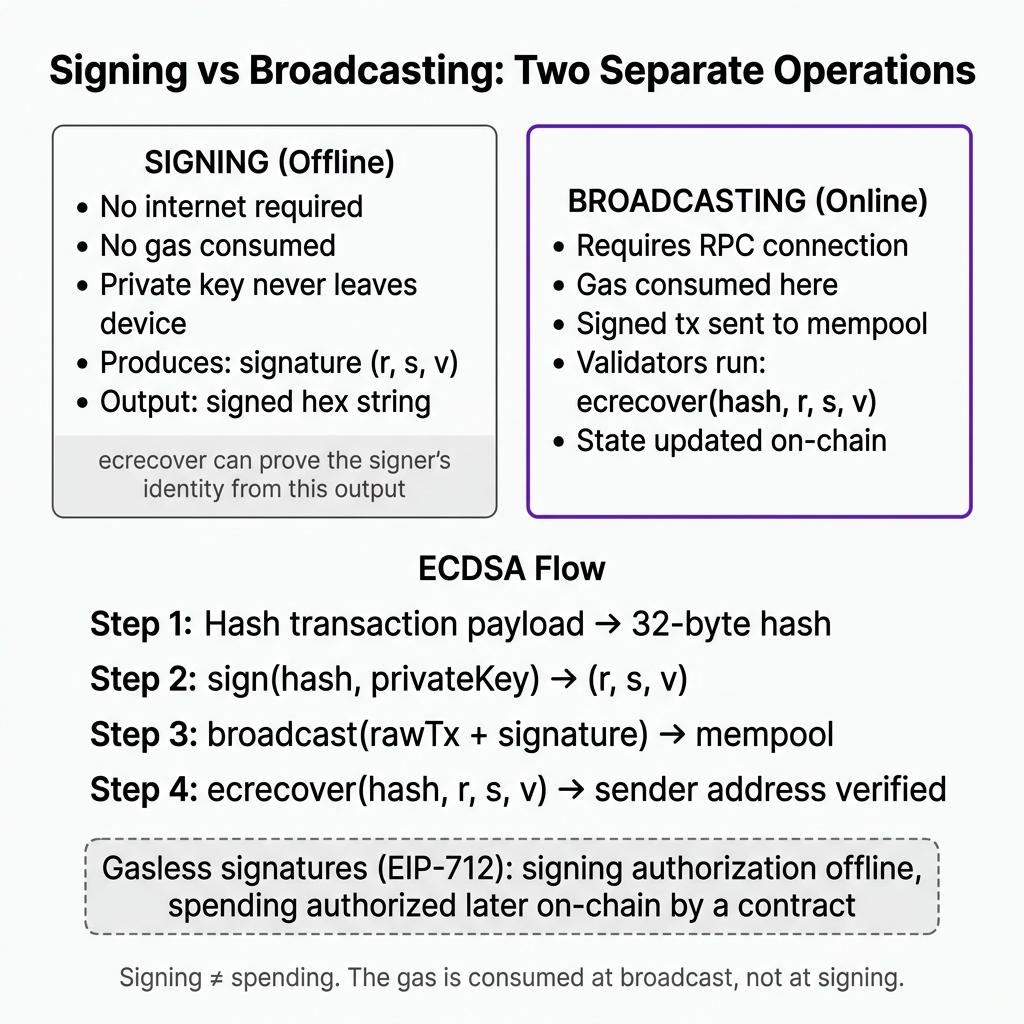
4. Important Realization: Signing does not equal Broadcasting
A signature is an offline operation. Signing a transaction does not require internet access, does not write to the blockchain, and does not cost gas.
It is only when the signed transaction is broadcasted to the network and processed by validators that gas is consumed and state is updated.
This decouple is incredibly powerful. It is the foundation of:
- Gasless Signatures (EIP-712): Signing a permit message to let another contract move your tokens later without you paying gas now.
- Account Abstraction (ERC-4337): Signing a user operation off-chain that a bundler executes for you on-chain, sponsoring your gas.
I once signed a raw transaction hex generated by a local script, thinking it was just a local test handshake. The script had been hardcoded to broadcast it to public mempools, and I spent hours debugging why my test funds had migrated to an unknown address on-chain. Always distinguish between local signing environments and production node providers!
Use your browser dev tools next time you log into a Web3 app via a signature prompt. Look at the network tab to see the signed payload ((r, s, v) or a long hex string starting with 0x) and notice that no transaction was sent to a blockchain explorer like Etherscan.
Was this lesson helpful?
Let us know what you think of this specification. (submitting anonymously)